Product
Prepare, review and schedule content in one workspace.
Keep the original draft, channel versions, feedback and schedule together. Work through the same content with your team and agents.
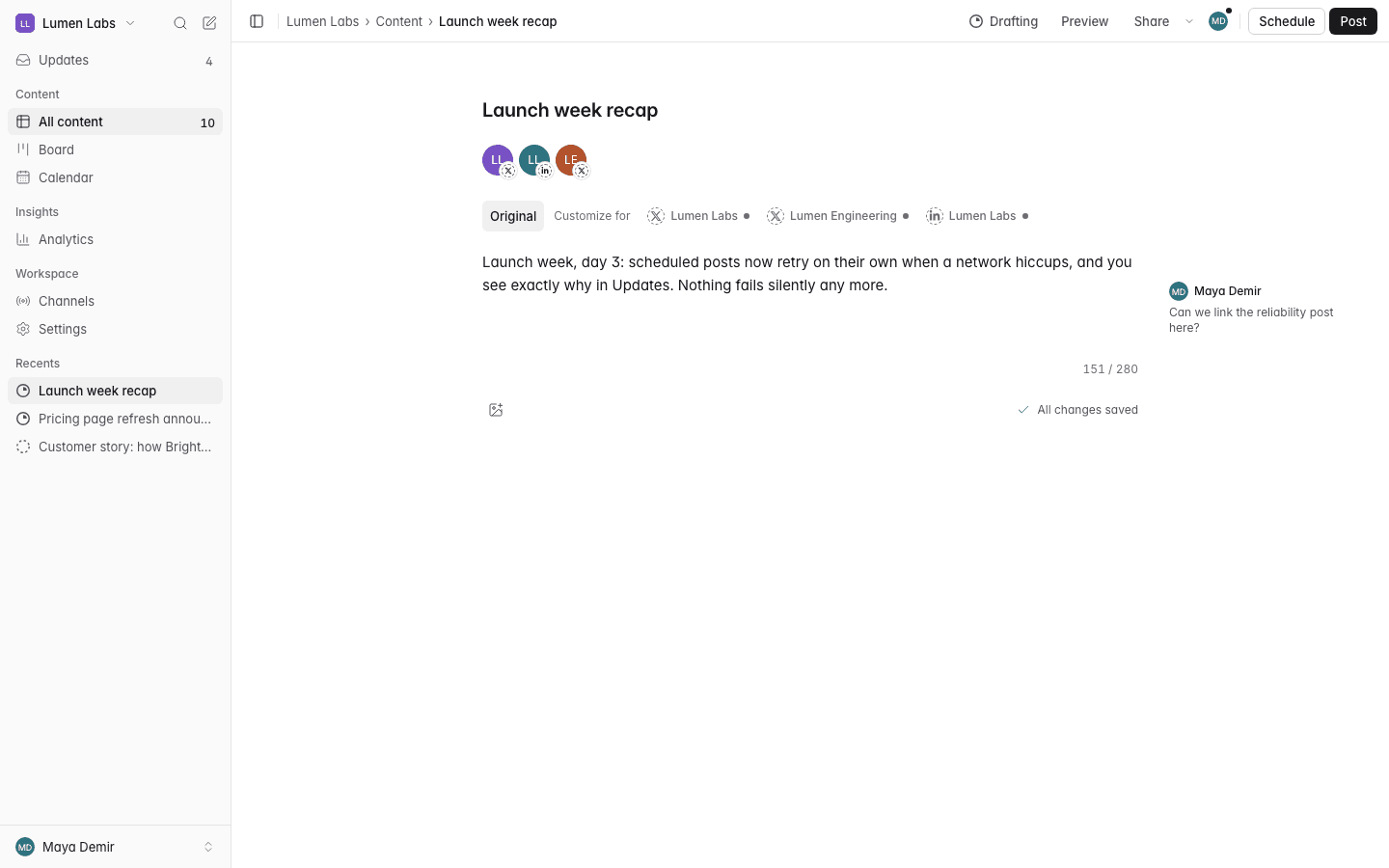
Write for each channel
Start with your notes, a draft or source material. Prepare separate versions for your connected channels while keeping the main point and brand voice consistent.
- One original draft becomes a version for each channel you pick. You or the AI do the first pass; you edit.
- Channel rules for length, format and media are checked as you write, before anything is scheduled.
Get feedback on the content
Share a review link with your team. Keep comments and named approvals beside the version they reviewed.
- Reviewers open the link without an account. They’re asked for their name once, then see the content.
- They say “Looks good” or “Needs changes” on exactly the version that will go out. Changing it afterwards voids the approval.
Work with your agents
Let agents prepare and edit drafts in the workspace. Review their changes and decide what is ready to publish.
- Agents connect through MCP or the API and see only the workspaces you choose.
- Everything an agent does is attributed to it by name.
- Posts an agent schedules wait for a person to confirm, unless a workspace owner has turned on auto-publish for that agent in that workspace.
Plan what goes out
Use Board to track preparation and Calendar to plan channel posts by date. See publishing issues and the next action on the affected post.
- Content, Board and Calendar are three views of the same content, with one set of filters.
- Every publish attempt is recorded and retried safely. A failed post is never silent: you see it in the app and get notified.
- After a post goes out, you get a link to it on each channel and its results from the metrics the channel provides.
Channels
- XPost · Thread · Image post · Multi-image post · Video post · Link post
No platform review needed: connect your X account and post. X charges per post, so paid plans include a monthly X allowance; Free doesn't include X.
What you do in the X app
- X has no way to schedule a post ahead of time through its API. heyeveryone holds the post and publishes it at the chosen time.
- Quoting another post through the API is limited to X's Enterprise plan. Quote posts are made in the X app.
- On X's self-serve plans the API can reply only when the original author mentioned or quoted your account. Replies to other people's posts are made in the X app.
- Polls exist in the X API schema but may need higher access; heyeveryone doesn't create them. Add a poll in the X app.
- LinkedInText post · Image post · Multi-image post · Video post · Link postLimited
Company pages are waiting for LinkedIn to approve our Community Management API access, which LinkedIn reviews by hand. Personal profiles work now; posts for pages go to the post kit until then.
What you do in the LinkedIn app
- LinkedIn has no way to schedule a post ahead of time through its API. heyeveryone holds the post and publishes it at the chosen time.
- Tagging people or pages. LinkedIn's API doesn't support @-mentions from personal profiles, so an @name is posted as plain text. Add tags in LinkedIn after the post is live.
- Swipeable carousel posts are for ads only on LinkedIn. A regular post with several images is still possible.
- LinkedIn does not build the link card from the page on its own through the API; the title (and optionally a description and image) must be supplied.
- ThreadsText post · Image post · Video post · Carousel · ThreadLimited
Publishing needs Meta's app review. Until it passes, only people added as Threads testers can connect and publish.
What you do in the Threads app
- Threads has no way to schedule a post ahead of time through its API. heyeveryone holds the post and publishes it at the chosen time.
- The Threads API can attach a poll, but heyeveryone doesn't create polls yet. Add the poll in the Threads app.
- BlueskyPost · Thread · Image post · Multi-image post · Video post · Link post
No platform review needed: connect with your handle and an app password created in Bluesky's settings, never your main password.
What you do in the Bluesky app
- Bluesky has no way to schedule a post ahead of time. heyeveryone holds the post and publishes it at the chosen time.
- Bluesky has no polls.
- InstagramImage post · Carousel · ReelLimited
Works now for accounts with a role on the heyeveryone Meta app (Standard Access). Serving every customer needs Advanced Access, which requires Meta App Review and Business Verification.
What you do in the Instagram app
- heyeveryone doesn't publish Instagram Stories yet (the API supports them). Post Stories in the Instagram app.
- Product tags can only be added in the Instagram app.
- Instagram filters can only be applied in the Instagram app.
- Licensed music can't be added through the API, and heyeveryone doesn't use Instagram's Audio API for Reels yet. Add music in the Instagram app.
- Instagram does not support alt text on Reels.
- Facebook PagesText or link post · Photo post · Multi-photo post · Video post · ReelLimited
Works now only for people with a role on the heyeveryone Meta app (administrators, developers, testers) and the Pages they manage. Serving every customer needs Advanced Access, which requires Meta App Review and Business Verification.
What you do in the Facebook Pages app
- Posting to a personal Facebook profile isn't possible; only Pages are supported.
- Facebook Stories can't be published through the API. Post them in the Facebook app.
- Live video is not supported. Go live from Facebook itself.
- TikTokVideo · Photo post · Send to TikTok drafts · Send photos to TikTok draftsLimited
TikTok has not audited heyeveryone yet, so posts go out as private (Only me), the TikTok account must be private at the time of posting, and at most 5 accounts can post through heyeveryone in any 24 hours. Sending to TikTok drafts isn't limited this way: you choose who can see the post when you post it in TikTok.
What you do in the TikTok app
- Picking a specific TikTok sound or music track can only be done in the TikTok app.
- Effects, filters, stickers and text overlays can only be added in the TikTok app.
- Making a Duet or Stitch of another video can only be done in the TikTok app.
- YouTubeVideo · ShortLimited
Until Google audits our API project, every upload is private, whatever visibility is chosen. Until Google verifies the heyeveryone app, connecting YouTube shows Google's "unverified app" screen, and at most 100 new users in total can connect: a lifetime cap Google can't reset.
What you do in the YouTube app
- Community posts can only be made on YouTube itself.
- Music from YouTube's audio library can only be added in YouTube Studio.
- A custom thumbnail needs a phone-verified channel. Verify the channel on YouTube first.
- YouTube decides what is a Short (vertical or square, 3 minutes or less). It can't be forced.
- Custom thumbnails for Shorts can only be set in YouTube Studio on a computer. heyeveryone posts the Short without one.
AI credits, explained
Agent access is included in every plan. Only actions that run heyeveryone’s own AI use credits, with the cost shown before they run. Your agent provider may charge separately.